> ## Documentation Index
> Fetch the complete documentation index at: https://docs.codeant.ai/llms.txt
> Use this file to discover all available pages before exploring further.
# Jira Ticket Compliance
> Check whether the code changes are compliant with jira ticket requirements
### Overview
CodeAnt AI's **Jira Ticket Compliance** feature ensures engineering output aligns with Jira-defined scope. It cross-verifies whether the requirements listed in each ticket are fully implemented in the corresponding pull request—flagging deviations, partial implementations, or missed functionality.
This feature acts as a gatekeeper for scope creep, ticket inflation, and misaligned engineering work, driving accountability and tight product–engineering coordination.
***
### Setup
1. **Connect Your Jira Workspace:**
Follow the instructions in the [Jira Integration Guide](https://docs.codeant.ai/control_center/jira/setup) to configure your Jira credentials in CodeAnt AI's control center.
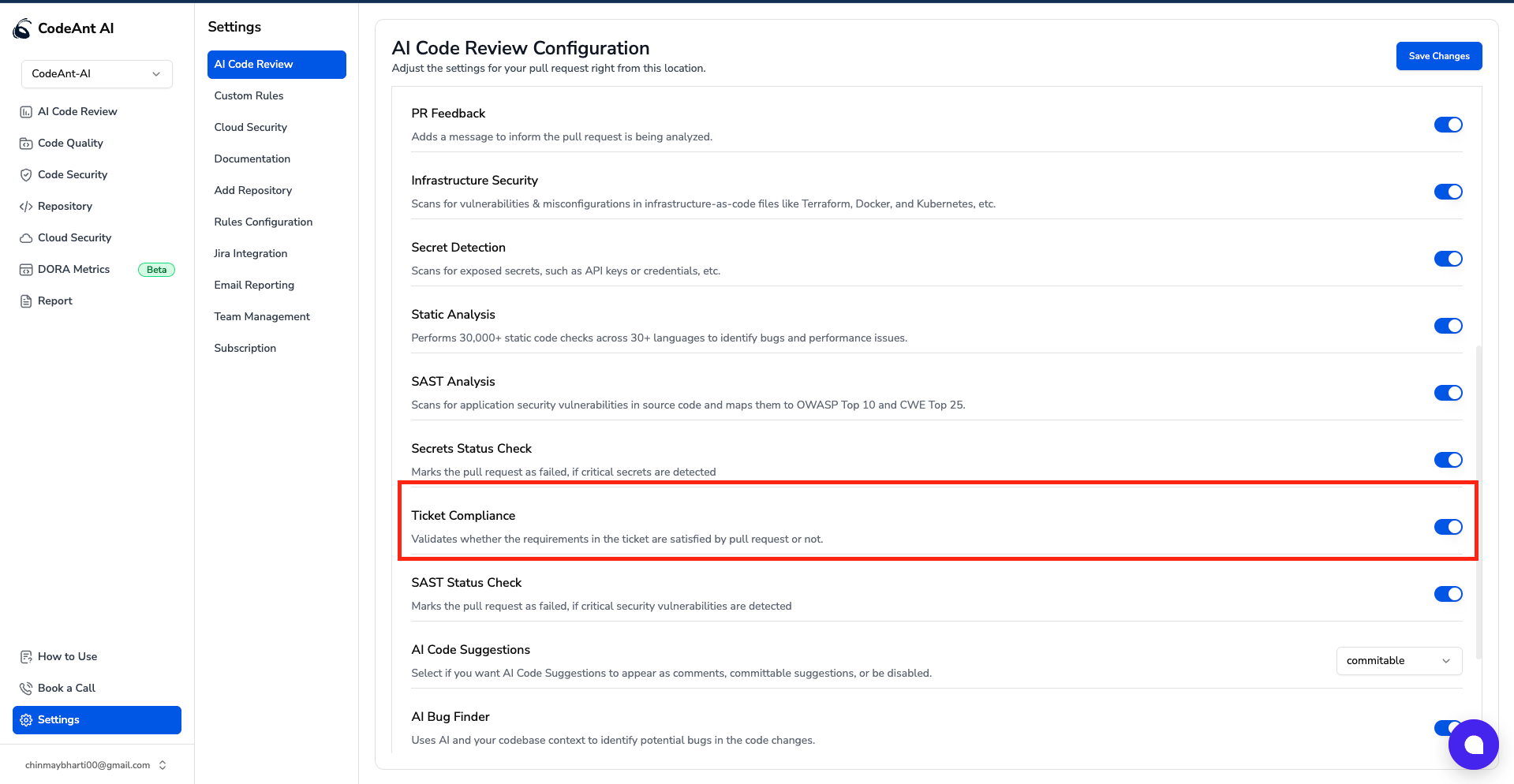
2. **Enable Ticket Compliance:**
* Navigate to `Settings` → `AI Code Review` → `Ticket Compliance`.
* Toggle the feature **on** to activate compliance checks in your pull requests.
*  3. **Additional Requirement:**
* There should be atleast one Jira ticket id/link in title or description
4. **Result**
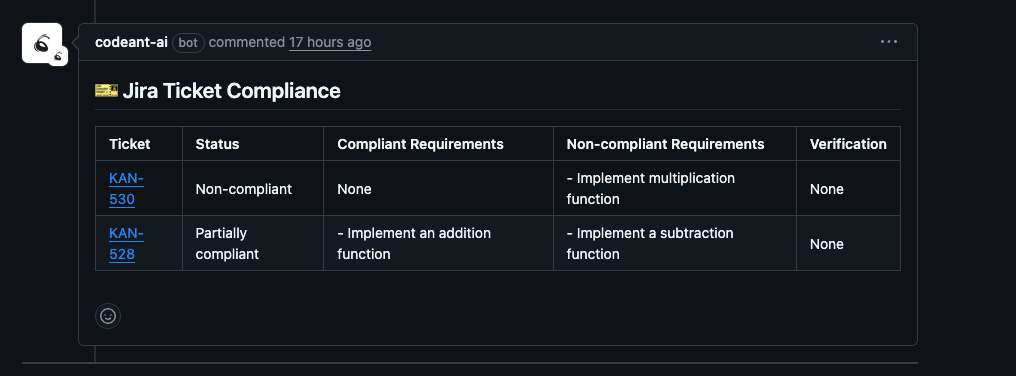
* If all the above requirements are met, then you will see a comment on your PR stating the compliance with the tickets
*
3. **Additional Requirement:**
* There should be atleast one Jira ticket id/link in title or description
4. **Result**
* If all the above requirements are met, then you will see a comment on your PR stating the compliance with the tickets
*  ***
### Key Features
* **Automated Scope Validation:**
Parses Jira tickets and compares expected functionalities against changes made in the pull request.
* **Clear Compliance Classification:**
Tags tickets as:
* ✅ **Compliant**: All stated requirements met.
* ⚠️ **Partially Compliant**: Some but not all requirements met.
* ❌ **Non-compliant**: No clear implementation of ticket requirements.
* **Detailed Breakdown:**
Generates a Markdown summary listing:
* Compliant Requirements
* Non-compliant or missing implementations
* Ticket metadata (status, ID, verification)
* **Pull Request Integration:**
Comments directly on the PR with a summary table, making it easy to review and act on.
***
### Benefits
* **Product Alignment:** Ensures engineers deliver exactly what was agreed upon with product teams.
* **Audit-Friendly:** Creates a paper trail of what was implemented per ticket, useful for compliance and retrospectives.
* **Increased Accountability:** Developers and reviewers get direct visibility into unmet ticket expectations.
* **Reduced Rework:** Flags incomplete implementation early, preventing bugs and reassignments later.
***
### Demo
For a live walkthrough of how CodeAnt AI checks Jira Ticket Compliance in pull requests and flags issues with unmet requirements, check out our [demo guide](#).
***
***
### Key Features
* **Automated Scope Validation:**
Parses Jira tickets and compares expected functionalities against changes made in the pull request.
* **Clear Compliance Classification:**
Tags tickets as:
* ✅ **Compliant**: All stated requirements met.
* ⚠️ **Partially Compliant**: Some but not all requirements met.
* ❌ **Non-compliant**: No clear implementation of ticket requirements.
* **Detailed Breakdown:**
Generates a Markdown summary listing:
* Compliant Requirements
* Non-compliant or missing implementations
* Ticket metadata (status, ID, verification)
* **Pull Request Integration:**
Comments directly on the PR with a summary table, making it easy to review and act on.
***
### Benefits
* **Product Alignment:** Ensures engineers deliver exactly what was agreed upon with product teams.
* **Audit-Friendly:** Creates a paper trail of what was implemented per ticket, useful for compliance and retrospectives.
* **Increased Accountability:** Developers and reviewers get direct visibility into unmet ticket expectations.
* **Reduced Rework:** Flags incomplete implementation early, preventing bugs and reassignments later.
***
### Demo
For a live walkthrough of how CodeAnt AI checks Jira Ticket Compliance in pull requests and flags issues with unmet requirements, check out our [demo guide](#).
***