> ## Documentation Index
> Fetch the complete documentation index at: https://docs.codeant.ai/llms.txt
> Use this file to discover all available pages before exploring further.
# Bitbucket
> Setup CodeAnt on Bitbucket Workspace
Getting started with CodeAnt AI on Bitbucket. Simply install our app from the [Atlassian Marketplace](https://shorturl.at/yFh07), and it will automatically integrate with your repositories. Once connected, CodeAnt AI delivers real-time suggestions and automated fixes to enhance your code quality and security.
After installation, our Pull Request Review feature activates immediately, ensuring your code is continuously evaluated.
For full control over your repositories' health, visit our Control Center at [app.codeant.ai](https://app.codeant.ai/).
## Personal Workspaces (API Token)
**Personal Bitbucket workspaces don't allow Marketplace apps to be installed.** For those, connect CodeAnt using an **Atlassian API token** instead - Pull Request review, the quality gate, and AI code suggestions then work exactly the same as an app-based install. (This applies to **Bitbucket Cloud** only.)
1. **Create an Atlassian API token**\
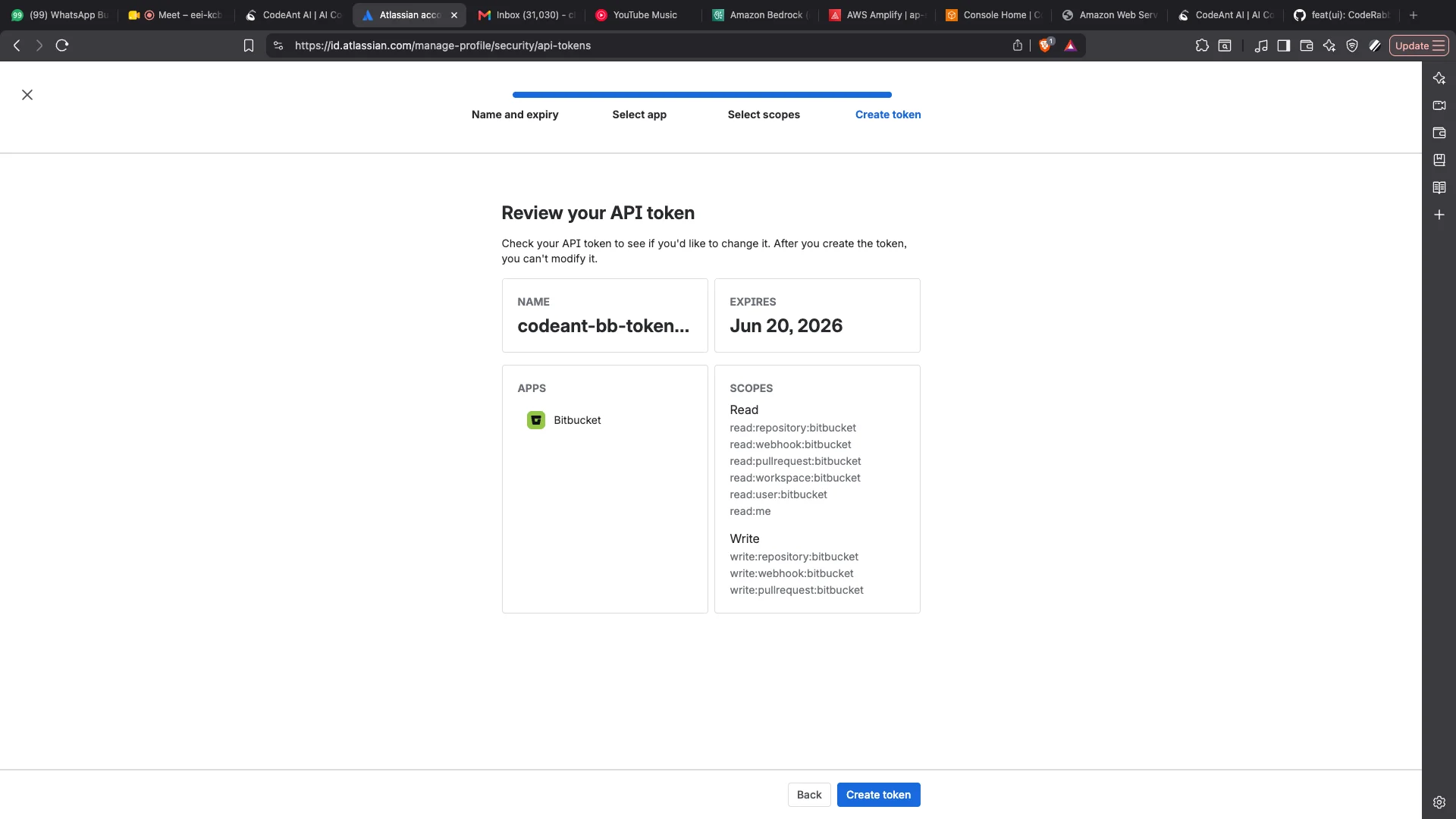
Go to [id.atlassian.com → Security → API tokens](https://id.atlassian.com/manage-profile/security/api-tokens), click **Create API token with scopes**, give it a name and an expiry, then select the app **Bitbucket**.
2. **Grant these scopes**
* **Repositories** - read & write
* **Pull requests** - read & write
* **Webhooks** - read & write
* **Account** - read (`read:me`)
* **User** - read (`read:user:bitbucket`)
* **Workspaces** - read (`read:workspace:bitbucket`)
All of the scopes above are required: **Account** validates the token when connecting, and **Workspaces** / **User** are needed for AI code suggestions. Your selected scopes should match the screenshot below.\\
 3. **Connect in CodeAnt**\
Sign in at [app.codeant.ai](https://app.codeant.ai/) with your Bitbucket account, choose **Use API Token** on the repositories screen, enter your **Atlassian email** and the **API token**, then click **Connect Workspace**. CodeAnt validates the token, stores it for your workspace, and automatically creates the webhooks that trigger reviews.
If the token later expires or is revoked, the workspace will show as disconnected - just create a new token with the same scopes and reconnect.
## Disabling Repositories
By default, the CodeAnt app is enabled for all repositories in your workspace. If you want to exclude certain repositories from CodeAnt, follow these steps:
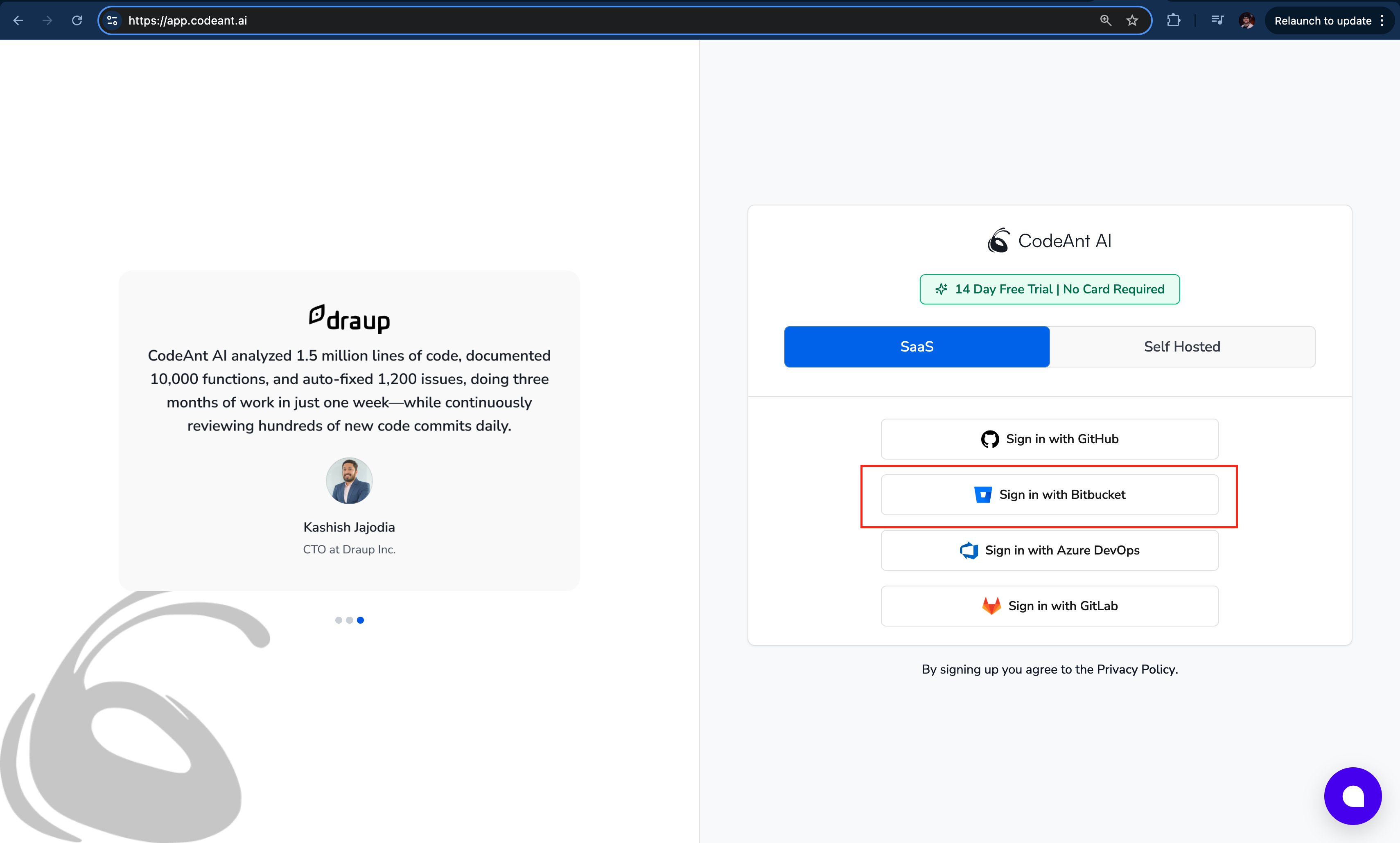
1. **Log In with Bitbucket**\
Visit [app.codeant.ai](https://app.codeant.ai/) and sign in using your Bitbucket account.\\
3. **Connect in CodeAnt**\
Sign in at [app.codeant.ai](https://app.codeant.ai/) with your Bitbucket account, choose **Use API Token** on the repositories screen, enter your **Atlassian email** and the **API token**, then click **Connect Workspace**. CodeAnt validates the token, stores it for your workspace, and automatically creates the webhooks that trigger reviews.
If the token later expires or is revoked, the workspace will show as disconnected - just create a new token with the same scopes and reconnect.
## Disabling Repositories
By default, the CodeAnt app is enabled for all repositories in your workspace. If you want to exclude certain repositories from CodeAnt, follow these steps:
1. **Log In with Bitbucket**\
Visit [app.codeant.ai](https://app.codeant.ai/) and sign in using your Bitbucket account.\\
 2. **Access Settings**\
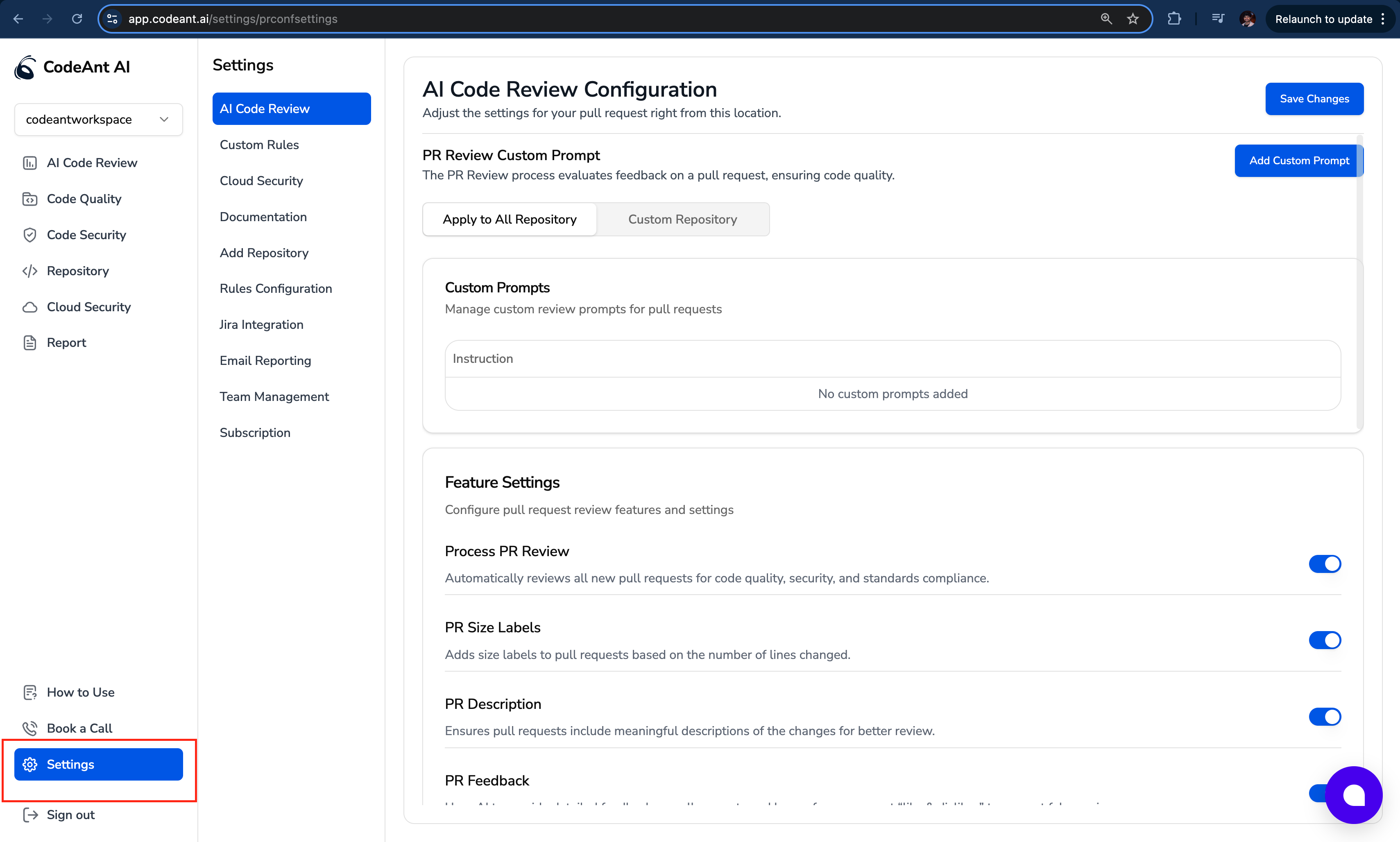
Navigate to **Settings** and select the **AI Code Review** section.\\
2. **Access Settings**\
Navigate to **Settings** and select the **AI Code Review** section.\\
 3. **Configure Repositories**\
Scroll down to the **Configure Repos** section and click the **Configure** button.\\
3. **Configure Repositories**\
Scroll down to the **Configure Repos** section and click the **Configure** button.\\
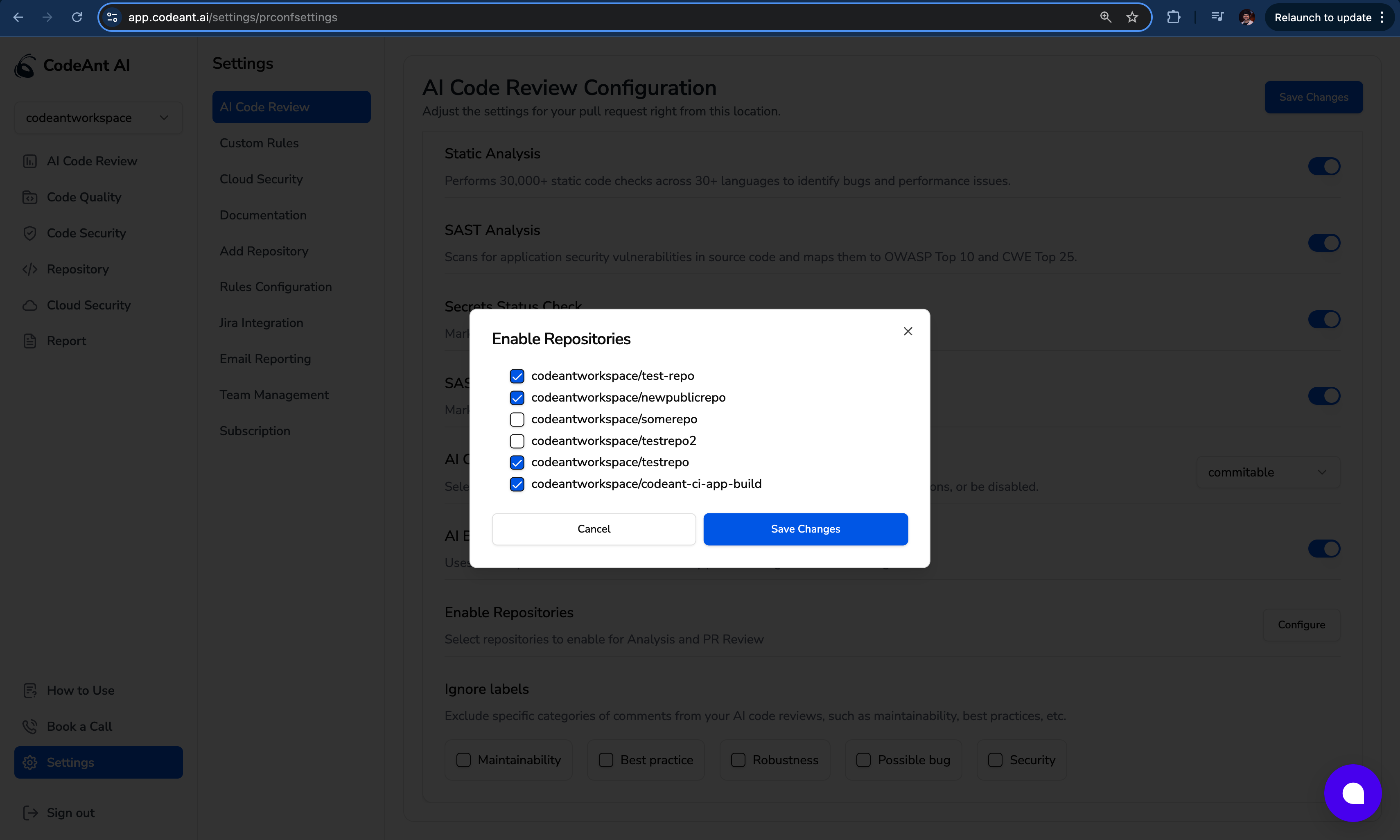
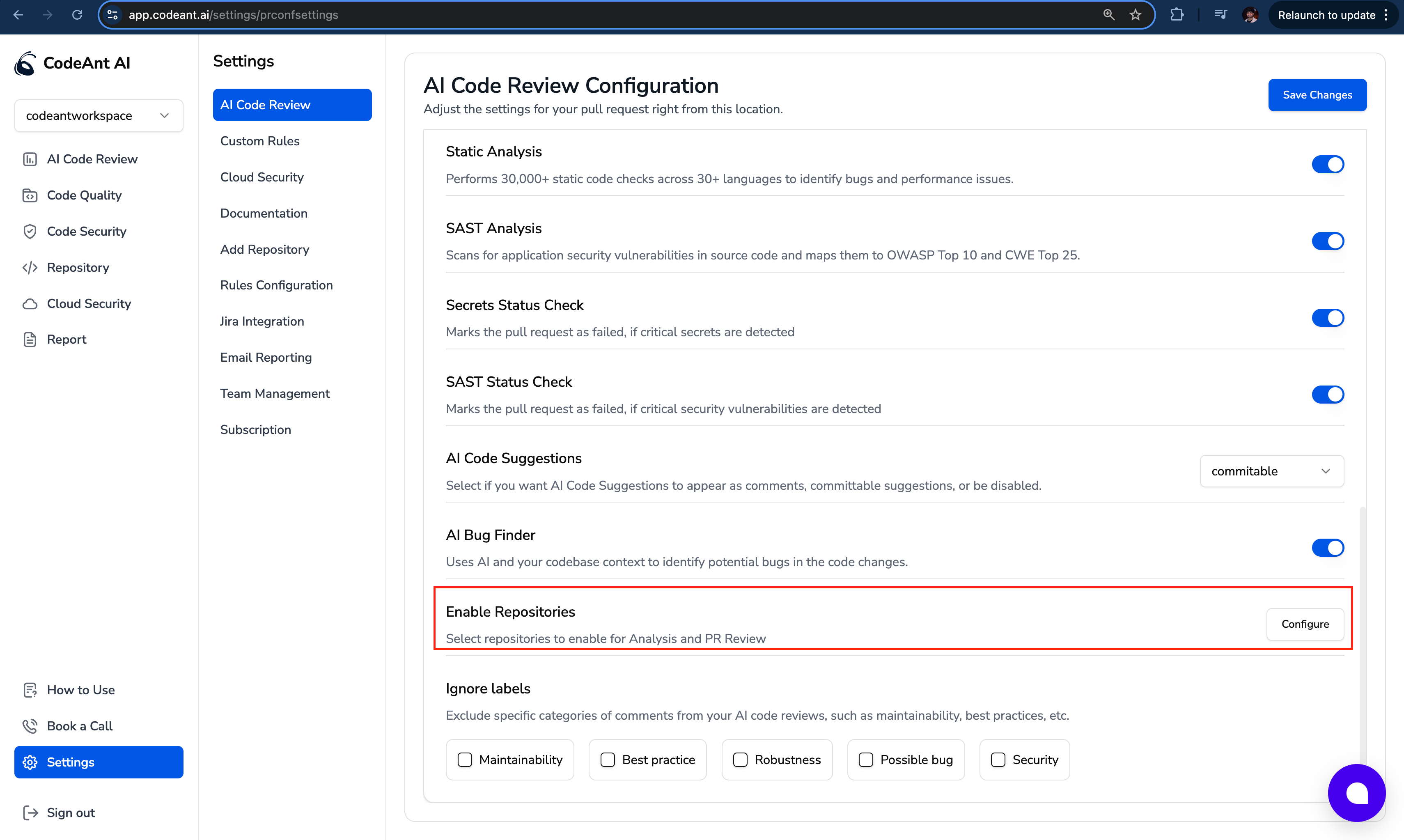 4. **Save Your Changes**\
Check the boxes for the repositories you wish to keep enabled; any unchecked repositories will be disabled. Click the **Save Changes** button to apply your updates.\\
4. **Save Your Changes**\
Check the boxes for the repositories you wish to keep enabled; any unchecked repositories will be disabled. Click the **Save Changes** button to apply your updates.\\