

Overview
CodeAnt AI reviews every pull request by posting inline comments directly on the lines of code that need attention. Each comment is structured to give you everything you need to understand, verify, and fix the issue - without switching context.What a Review Comment Looks Like
Every inline comment from CodeAnt AI includes four parts:1. Issue Description
A clear explanation of what the problem is and why it matters. The description categorizes the issue (e.g.,possible bug, logic error, concurrency bug) so you can quickly understand the nature of the problem.
Example: “Markdown fence parsing is done before trimming whitespace, so responses like\n```json ...fail JSON parsing and get downgraded to default LOW results. Strip whitespace first, then remove fences.”[possible bug]
2. Severity Level
Each issue is classified by severity so you can prioritize your fixes:3. Suggested Fix
A ready-to-use code snippet that resolves the issue. You have two ways to apply it:- Apply Suggestion - click Commit suggestion directly on the review comment to commit the fix.
- Prompt for AI Agent - expand the Prompt for AI Agent section on the review comment to get a ready-made prompt with the full context of the issue, the fix, and the steps of reproduction. Copy it and paste it into your AI coding agent (Cursor, Copilot, Claude Code) and let it apply the fix with full awareness of your codebase.
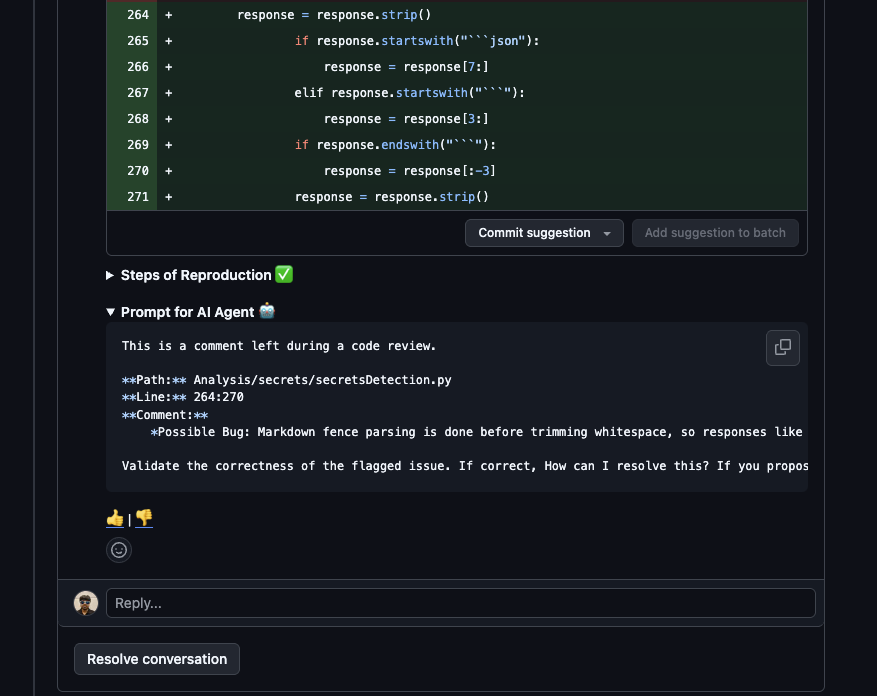
4. Steps of Reproduction
This is the key differentiator. Each review comment includes detailed, numbered steps showing exactly how to trigger the issue - with file paths and line numbers.Example: Steps of Reproduction
Example: Steps of Reproduction
For a bug where unscored secrets get incorrectly marked as false positives:
- Call
POST /analysis/secrets/run, which createsAdvanced_Analysis(feature="secrets")and executesrun(). - In detection flow, entropy findings are capped by
collect_entropy_secrets(..., max_tasks=500)so only the first 500 entropy items are AI-scored. - Remaining entropy findings keep
confidence_score=Nonebecause_process_confidence_scoring(tasks)only mutates selected tasks, thenmark_false_positives()converts allNonetoFALSE_POSITIVE. - Downstream components explicitly drop
FALSE_POSITIVE, so unscored secrets disappear from outputs.
- Verify the issue exists by following the exact execution path
- Understand the root cause through the chain of function calls
- Test their fix by replaying the same scenario
- Communicate with teammates using a shared, precise reference
Impact Analysis
Alongside the steps of reproduction, each critical or high severity comment includes an impact analysis - a bullet list of downstream consequences if the issue is left unfixed.Example impact analysis:
- Entropy secrets downgraded to
FALSE_POSITIVEafter parse miss.- Confidence scoring reliability drops on fenced AI output.
- CI quality-gate scans may block on one file.